

Introduction
You see a hosting plan for a couple of dollars a month, sign up, and feel pleased with the deal. A year later, the renewal email arrives, and the price has jumped to several times what you paid.
That’s the renewal price shock, and it catches thousands of new site owners every year. The good news is that it’s easy to avoid if you know what to check before you pay. This guide shows you how.
Key Highlights
- Intro prices are teasers: Hosts discount the first term, then renew at a much higher rate.
- Check before you buy: Look at the renewal price, term length, auto-renew, free domain fees, and refund window.
- Compare total cost: Add up what you’ll pay over the whole term, not just the monthly price.
- Already signed up? Find your renewal date, set reminders, and ask support for the renewal price.
Why Hosting Renewal Prices Jump
The low price on a hosting ad is usually an introductory offer. Hosts discount the first term to win you as a customer, then charge the standard rate when it ends. That standard rate is often much higher, and it can arrive with little warning if auto-renew is switched on.
The cheapest-looking plan is also often the one that needs the longest commitment. The best price may only apply if you pay for two, three, or even four years upfront.
7 Questions to Ask Before You Buy
Check these on the pricing page and in the terms, not just the headline price:
- What’s the renewal price? Look for the price after the first term, per month and per year.
- How long is the first term? Is the advertised price for 12, 24, or 48 months?
- Does the promo price need a long commitment? Shorter terms usually cost more per month.
- Is renewal automatic? If yes, find out how to switch it off.
- Is the free domain really free? Many hosts give a domain free for the first year, then charge the normal renewal fee.
- What’s the refund window? Know how many days you have to cancel and what’s refundable.
- Which features are extras? Backups, email, SSL, and support can cost more on some plans.
If the answer isn’t clear on the page, ask the host’s support in chat and keep the reply. A friendly agent saying the price is “competitive” is not the same as a stated renewal price.
Work Out the Real Cost
Don’t compare the price per month. Compare what you’ll actually pay over the full time you plan to keep the site.
Here’s a simple example (illustrative numbers only):
- Year 1: $3 a month, so $36
- Year 2: $9 a month after renewal, so $108
- Total over two years: $144, which is an average of $6 a month, double the advertised price
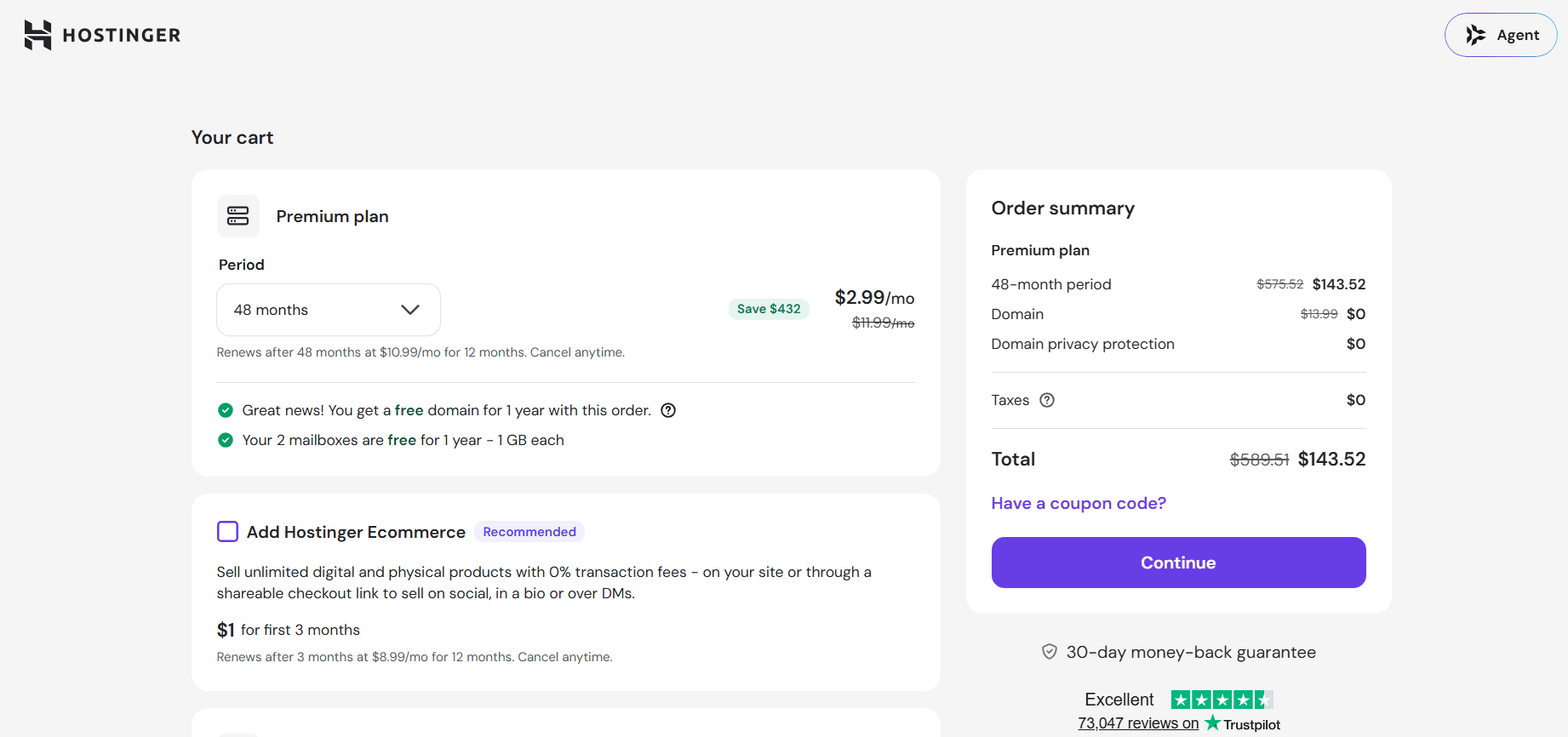
A plan that looks twice as cheap can end up costing about the same as a competitor over two years. Always do this sum.
Here’s how three popular hosts compare on the prices that matter (checked on 11/10/2026):
| Host and Plan | Intro Price | Term Needed | Renewal Price | Increase |
|---|---|---|---|---|
| Hostinger Premium | $2.99/mo | 48 months ($143.52 upfront) | $10.99/mo | about 268% |
| Namecheap Stellar Plus | about $2.99/mo | 1 year ($35.88) | $85.44/yr (~ $7.12/mo) | about 138% |
| DreamHost Shared | $2.89/mo | 1 year ($34.68) | $10.99/mo ($131.88/year) | about 280% |
Be Careful With Long Terms
Choosing a 48-month plan gives you the lowest monthly price and locks it for longer. But there are trade-offs:
- You pay a lot upfront, which is harder if cash is tight.
- You’re committed, so if the host is slow or your site outgrows the plan, switching is harder.
- The price jump still comes, just later. Add a reminder for it on day one.
- Refunds often cover only the first days. Check what you can get back after that.
A good rule: choose the longest term only if you’re confident in the host, you’ve read the refund terms, and you’ve noted the renewal date.
Check the Extras and the Currency
The hosting price isn’t always the full bill. Look for:
- Domain renewal: often a normal yearly fee after the free year
- Backups, email, and security add-ons
- Taxes and payment fees
- Currency: most hosts charge in US dollars. If you pay with a local card or mobile money in Uganda, exchange rates and bank fees can change what you actually pay, and a jump at renewal will be felt more.
Add these extras to your total before comparing.
Already Signed Up? Do This Today
If you’ve already bought a plan, you can still avoid a surprise:
- Find your renewal date. Check your account billing page or the confirmation email.
- Put it in your calendar, with a reminder at least 30 days before.
- Check whether auto-renew is on, and switch it off if you want to decide first.
- Ask for the renewal quote. Support can tell you the price you’ll be charged and whether any discount applies.
- Compare alternatives using the table above, and back up your site so moving is easy.
- Ask for a discount. Some hosts will offer one if you say you’re considering leaving, though it isn’t guaranteed.
Quick Questions
Do all hosts raise prices at renewal?
Most do, but the size of the increase varies a lot, so check each one.
Can I lock in the intro price forever?
Usually not. A longer term keeps it for longer, but the price changes when it ends.
Is the cheapest host a bad choice?
Not necessarily. Many are good value if you know the renewal price and budget for it from day one.
The Bottom Line
The headline price tells you what the host wants you to notice. The renewal price tells you what you’ll actually pay. Check the second one before you buy, do the two-year math, note your renewal date, and decide at renewal rather than being surprised by it.
Want to see how this plays out with a real host? Read our Hostinger Review: The Truth About Renewals And Pricing. Already have hosting, and renewal is coming up? See our Hosting Renewal Checklist: How to Plan, Negotiate and Switch